Wednesday, 16 January 2019

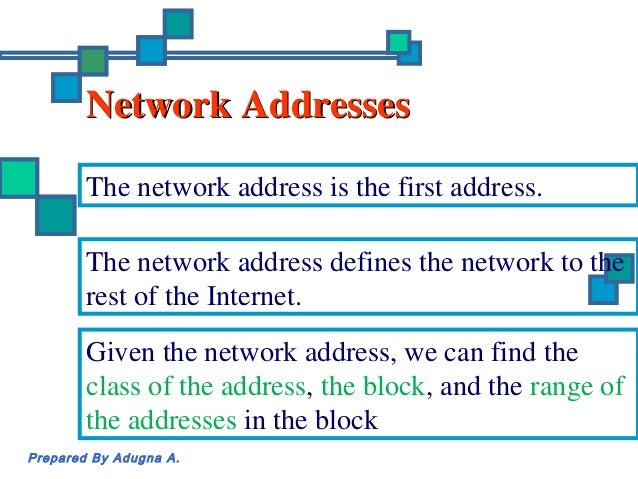
What is a Network Address


Network Addresses


What is a Network Address?

A network address is any logical or physical address that uniquely distinguishes a network node or device over a computer or telecommunications network. It is a numeric/symbolic number or address that is assigned to any device that seeks access to or is part of a network.

Network address is a key networking technology component that facilitates identifying a network node/device and reaching a device over a network. It has several forms, including the Internet Protocol (IP) address, media access control (MAC) address and host address. It

Computers on a network use a network address to identify, locate and address other computers. Besides individual devices, a network address is typically unique for each interface; for example, a computer's Wi-Fi and local area network (LAN) card has separate network addresses.

A network address is also known as the numerical network part of an IP address. This is used to distinguish a network that has its own hosts and addresses. For example, in the IP address 192.168.1.0, the network address is 192.168.1.

Examples of Network Address:

Image result for chart example of Network address

IP Versions


IPv4 or IP version 4


Internet Protocol Version 4 (IPv4) is the fourth revision of the Internet Protocol and a widely used protocol in data communication over different kinds of networks. IPv4 is a connectionless protocol used in packet-switched layer networks, such as Ethernet. It provides the logical connection between network devices by providing identification for each device. There are many ways to configure IPv4 with all kinds of devices – including manual and automatic configurations – depending on the network type.

IPv4 is based on the best-effort model. This model guarantees neither delivery nor avoidance of duplicate delivery; these aspects are handled by the upper layer transport.

Pv4 is defined and specified in IETF publication RFC 791. It is used in the packet-switched link layer in the OSI model.


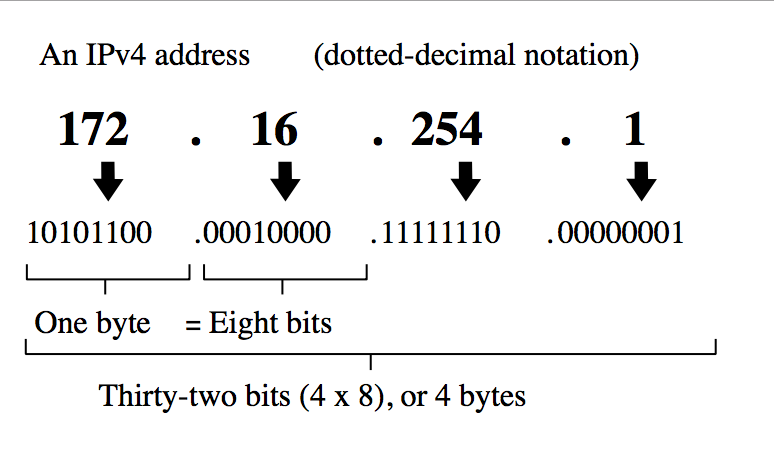
IPv4 uses 32-bit addresses for Ethernet communication in five classes: A, B, C, D and E. Classes A, B and C have a different bit length for addressing the network host. Class D addresses are reserved for multicasting, while class E addresses are reserved for future use.

Class A has subnet mask 255.0.0.0 or /8, B has subnet mask 255.255.0.0 or /16 and class C has subnet mask 255.255.255.0 or /24. For example, with a /16 subnet mask, the network 192.168.0.0 may use the address range of 192.168.0.0 to 192.168.255.255. Network hosts can take any address from this range; however, address 192.168.255.255 is reserved for broadcast within the network. The maximum number of host addresses IPv4 can assign to end users is 232.

IPv6 presents a standardized solution to overcome IPv4's limiations. Because of its 128-bit address length, it can define up to 2,128 addresses.

IPv6 or IP version 6

IPv6 (Internet Protocol version 6) is a set of specifications from the Internet Engineering Task Force (IETF) that's essentially an upgrade of IP version 4 (IPv4). The basics of IPv6 are similar to those of IPv4 -- devices can use IPv6 as source and destination addresses to pass packets over a network, and tools like ping work for network testing as they do in IPv4, with some slight variations.


The most obvious improvement in IPv6 over IPv4 is that IP addresses are lengthened from 32 bits to 128 bits. This extension anticipates considerable future growth of the Internet and provides relief for what was perceived as an impending shortage of network addresses. IPv6 also supports auto-configuration to help correct most of the shortcomings in version 4, and it has integrated security and mobility features.
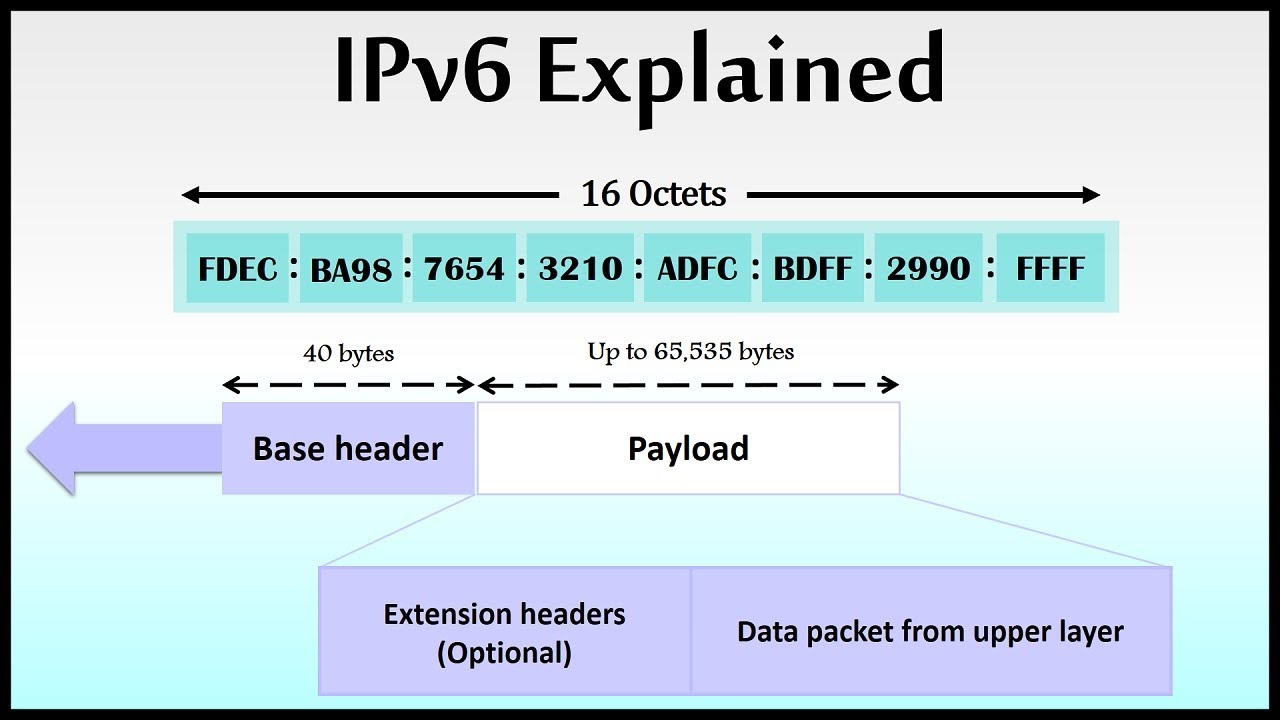


IPv6 features include:
Supports source and destination addresses that are 128 bits (16 bytes) long.
Requires IPSec support.
Uses Flow Label field to identify packet flow for QoS handling by router.
Allows the host to send fragments packets but not routers.
Doesn't include a checksum in the header.
Uses a link-local scope all-nodes multicast address.
Does not require manual configuration or DHCP.
Uses host address (AAAA) resource records in DNS to map host names to IPv6 addresses.
Uses pointer (PTR) resource records in the IP6.ARPA DNS domain to map IPv6 addresses to host names.
Supports a 1280-byte packet size (without fragmentation).
Moves optional data to IPv6 extension headers.
Uses Multicast Neighbor Solicitation messages to resolve IP addresses to link-layer addresses.
Uses Multicast Listener Discovery (MLD) messages to manage membership in local subnet groups.
Uses ICMPv6 Router Solicitation and Router Advertisement messages to determine the IP address of the best default gateway.

Binary Digit


A bit (short for binary digit) is the smallest unit of data in a computer. A bit has a single binary value, either 0 or 1. Although computers usually provide instructions that can test and manipulate bits, they generally are designed to store data and execute instructions in bit multiples called bytes. In most computer systems, there are eight bits in a byte. The value of a bit is usually stored as either above or below a designated level of electrical charge in a single capacitor within a memory device.


Half a byte (four bits) is called a nibble. In some systems, the term octet is used for an eight-bit unit instead of byte. In many systems, four eight-bit bytes or octets form a 32-bit word. In such systems, instruction lengths are sometimes expressed as full-word (32 bits in length) or half-word (16 bits in length). 

In telecommunication, the bit rate is the number of bits that are transmitted in a given time period, usually a second.

Classes of IP Address


Note:


127 - Loop back Function of a network


Class D - Use for MULTICAST


Class E - reserved for FUTURE or EXPERIMENTAL PURPOSES.


ex.


100.168.2.2 = Class A


190.3.0.1 = Class B


STEPS IN CREATING IP ADDRESS


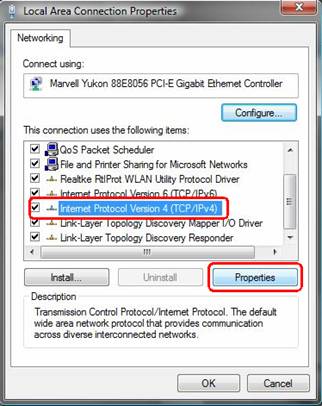
1. right click My Network Places 

2. Click Properties
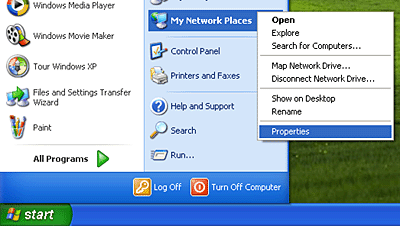
 

3. Right click local area connection

4. Click properties
Image result for right click local area connection

5. Click TCP/IP

6. Click Properties
Image result for click tcp or IP

7. Click OK

 Steps in IP Configuration

1. Click Startbutton
Related image

2. Click Run
Image result for click run

3. Type CMD
Related image

4. Type ipconfig

Wednesday, 10 October 2018

What are The Types of Cable

Types Of Cable
a. Twisted Pair


  Twisted pair is the ordinary copper wire that connects home and many business computers to the telephone company. To reduce crosstalk or electromagnetic induction between pairs of wires, two insulated copper wires are twisted around each other. Each connection on twisted pair requires both wires. Since some telephone sets or desktop locations require multiple connections, twisted pair is sometimes installed in two or more pairs, all within a single cable. For some business locations, twisted pair is enclosed in a shield that functions as a ground. This is known as shielded twisted pair (STP). Ordinary wire to the home is unshielded twisted pair (UTP).


  Twisted pair is now frequently installed with two pairs to the home, with the extra pair making it possible for you to add another line (perhaps for modem use) when you need it.
Twisted pair comes with each pair uniquely color coded when it is packaged in multiple pairs. Different uses such as analog, digital, and Ethernet require different pair multiples.
Although twisted pair is often associated with home use, a higher grade of twisted pair is often used for horizontal wiring in LAN installations because it is less expensive than coaxial cable.

Two Kinds of Twisted Pair


a. STP "Shielded Twisted Pair"


  Shielded twisted pair (STP) cable was originally designed by IBM for token ring networks that include two individual wires covered with a foil shielding, which prevents electromagnetic interference, thereby transporting data faster.

  STP is similar to unshielded twisted pair (UTP); however, it contains an extra foil wrapping or copper braid jacket to help shield the cable signals from interference. STP cables are costlier when compared to UTP, but has the advantage of being capable of supporting higher transmission rates across longer distances.

Image result for stp cable


  The other usual STP cables, often called foil twisted-pair cables or screened twisted-pair cables, make use of just a thinner outer foil shield. These cables are thin and more affordable versus the braided STP cable; but they are very difficult to install. Except in cases where the maximum pulling tension and minimum bend radius are strictly observed, these thinner cables may be torn during the installation process.
  Furthermore, STP cables have some other drawbacks. STP cables function by drawing external interference to the shield, then getting rid of it into a grounded cable. If the ground cable is not properly grounded, STP's noise-canceling functionality can be seriously compromised.

b. UTP "Unshielded Twisted Pair"


  UTP stands for Unshielded Twisted Pair cable. UTP cable is a 100 ohm copper cable that consists of 2 to 1800 unshielded twisted pairs surrounded by an outer jacket. They have no metallic shield. This makes the cable small in diameter but unprotected against electrical interference. The twist helps to improve its immunity to electrical noise and EMI.


  UTP cables are mostly used for LAN networks. They can be used for voice, low-speed data, high-speed data, audio and paging systems, and building automation and control systems. UTP cable can be used in both the horizontal and backbone cabling subsystems.
  Horizontal UTP cable is four-pair construction by industry cabling standard. Each pair has two conductors. One wire of the pair is assigned the pair color with a white stripe and the other wire is assigned the color white with the pair color stripe. The table below lists the pair and color code for a four-pair horizontal UTP cable.

b. Coaxial Cable
Image result for coaxial cable

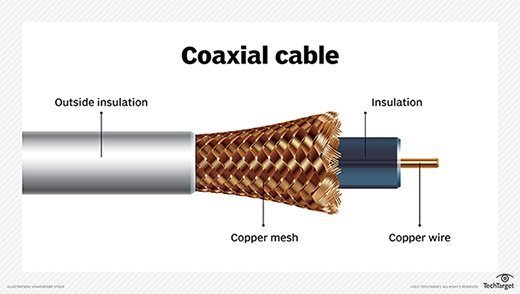
  A coaxial cable is a type of shielded and insulated copper cable that is used in computer networks and to deliver cable TV services to end users. It was first commercially implemented in the early 1940s and is used for both baseband and broadband data communication services.
  Coaxial cable is also known as coax, which is derived from the geometric axis created between a shield and insulator.

Related image

  A coaxial cable is used by cable TV service providers to stretch transmission lines from their branch or control offices to residential and business subscribers.
-It consists of four primary components, as follows:
-A core copper wire, which serves as the primary channel
-A dielectric plastic insulator, which surrounds the copper
-A braided copper/aluminum sheath beneath the insulator. This is used to protect from external electromagnetic interference.
-The last layer, which is made of Teflon or plastic coating, is used to protect the inner layers from physical damage, such as fire and water.

Image result for coaxial cable

  Coaxial cables tend to carry signals at a greater distance and are a good choice for weak signals, due to their layered protection. There are several types of coaxial cables, which are classified by the inner copper core diameter and number of protective sheaths.

c. Fiber Optic
Image result for fiber optic cable

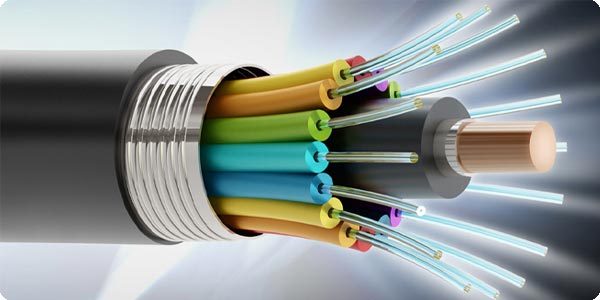
  A fiber optic cable is a network cable that contains strands of glass fibers inside an insulated casing. They're designed for long distance, very high-performance data networking, and telecommunications.
  Compared to wired cables, fiber optic cables provide higher bandwidth and can transmit data over longer distances. Fiber optic cables support much of the world's internet, cable television, and telephone systems.

Image result for fiber optic cable

  Fiber optic cables carry communication signals using pulses of light generated by small lasers or light-emitting diodes (LEDs).

  The cable consists of one or more strands of glass, each only slightly thicker than a human hair. The center of each strand is called the core, which provides the pathway for light to travel. The core is surrounded by a layer of glass called cladding that reflects light inward to avoid loss of signal and allow the light to pass through bends in the cable.

Related image

  The two primary types of fiber cables are called single mode and multi-mode fiber. Single mode fiber uses very thin glass strands and a laser to generate light while multi-mode fibers use LEDs.
  Single mode fiber networks often use Wave Division Multiplexing (WDM) techniques to increase the amount of data traffic that can be sent across the strand. WDM allows light at multiple different wavelengths to be combined (multiplexed) and later separated (de-multiplexed), effectively transmitting multiple communication streams via a single light pulse.

The Difference Between Straight-through Cable
and Cross-over Cable

  Ethernet cables can be wired as straight through or crossover. The straight through is the most common type and is used to connect computers to hubs or switches. They are most likely what you will find when you go to your local computer store and buy a patch cable. Crossover cable is more commonly used to connect a computer to a computer and may be a little harder to find since they aren’t used nearly as much as straight through cable. Then, what’s the difference between them? Difference between straight through and crossover cables will be introduced in this blog.

T568A And T568B Wiring Standard Basis
  A RJ45 connector is a modular 8 position, 8 pin connector used for terminating Cat5e or Cat6 twisted pair cable. A pinout is a specific arrangement of wires that dictate how the connector is terminated. There are two standards recognized by ANSI, TIA and EIA for wiring Ethernet cables. The first is the T568A wiring standard and the second is T568B. T568B has surpassed 568A and is seen as the default wiring scheme for twisted pair structured cabling. If you are unsure of which to use, choose 568B.

Image result for straight through cable


What Is Straight Through Cable?
  A straight through cable is a type of twisted pair cable that is used in local area networks to connect a computer to a network hub such as a router. This type of cable is also sometimes called a patch cable and is an alternative to wireless connections where one or more computers access a router through a wireless signal. On a straight through cable, the wired pins match. Straight through cable use one wiring standard: both ends use T568A wiring standard or both ends use T568B wiring standard. The following figure shows a straight through cable of which both ends are wired as the T568B standard.
straight-through-cable

What Is Crossover Cable?
  An Ethernet crossover cable is a type of Ethernet cable used to connect computing devices together directly. Unlike straight through cable, crossover cables use two different wiring standards: one end uses the T568A wiring standard, and the other end uses the T568B wiring standard. The internal wiring of Ethernet crossover cables reverses the transmit and receive signals. It is most often used to connect two devices of the same type: e.g. two computers (via network interface controller) or two switches to each other.

crossover cable

Choose a Straight Through or Crossover Cable?
  Usually, straight through cables are primarily used for connecting unlike devices. And crossover cables are use for connecting unlike devices alike devices.

Use straight through cable for the following cabling:
-Switch to router
-Switch to PC or server
-Hub to PC or server

Use crossover cables for the following cabling:
-Switch to switch
-Switch to hub
-Hub to hub
-Router to router
-Router Ethernet port to PC NIC
-PC to PC

choose-straight-through-or-crossover-cable

Conclusion
  Straight through and crossover cables are wired differently from each other. One easy way to tell what you have is to look at the order of the colored wires inside the RJ45 connector. If the order of the wires is the same on both ends, then you have a straight through cable. If not, then it’s most likely a crossover cable or was wired wrong. At present, the straight through cable is much more popular than crossover cable and is widely used by people. FS.COM provides a full range straight through Cat5e, Cat6, Cat6a and Cat7 Ethernet patch cables with many lengths and colors options.


Wednesday, 22 August 2018

What are the Types of Network Topology?

Image result for network topology

Network Topology
  A topology is the physical configuration of a network that determines how the network's computers are connected. Common configurations include the bus topology, linear bus, mesh topology, ring topology, star topology, tree topology and hybrid topology. See each of these topology definitions for additional information and visual examples.

Image result for network topology

  Is the arrangement of the various elements of the computer network. Essentially, it is the topological structure of a network, and may be depicted physically or logically.

There are 5 different types of network Topologies commonly used in communication systems.
These Include:
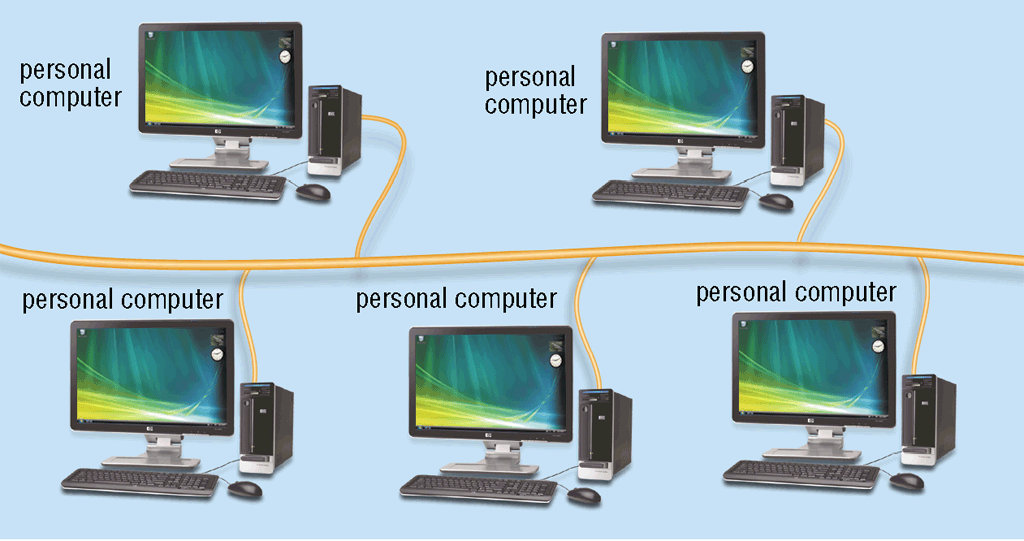
1. Linear Bus Topology
2. Star Topology
3. Ring Topology
4. Mesh Topology
5. Hybrid Topology

Related image

Linear Bus Topology
Image result for linear bus topology
  A type of network topology in which each device is connected one after the other in a sequential chain (shown right). In this case, the bus is the network connection between the devices, and if any link in the network chain is severed, all network transmission is halted.

Related image 
  It works well for small networks because it is simple to set up and utilizes shorter cables since each device is connected to the next. It is a poor solution for larger networks, however since the entire network relies on each connection, and network speed is reduced as more devices are added.

Star Topology
Image result for star topology

  One of the most common network setups. In this configuration, every node connects to a central network device, like a hub, switch, or computer. The central network device acts as a server and the peripheral devices act as clients. Depending on the type of network card used in each computer of the star topology, a coaxial cable or a RJ-45 network cable is used to connect computers together.

Image result for star topology

  Uses a central device called HUB with cables extending in all directions. Each networked device is connected directly to the hub. Data from a computer passes through the hub or switch before it can reach the other target node. One of its advantages is the lack of disruptions to the network when connecting or removing devices; however, if the hub fails, attached nodes will not be able to use the network resources.

Ring Topology
Image result for ring topology

  A network configuration in which device connections create a circular data path. Each networked device is connected to two others, like points on a circle. Together, devices in a ring topology are referred to as a ring network. 

Image result for ringtopology

  In a ring network, packets of data travel from one device to the next until they reach their destination. Most ring topologies allow packets to travel only in one direction, called a unidirectional ring network. Others permit data to move in either direction, called bidirectional.

Mesh Topology
Image result for mesh topology
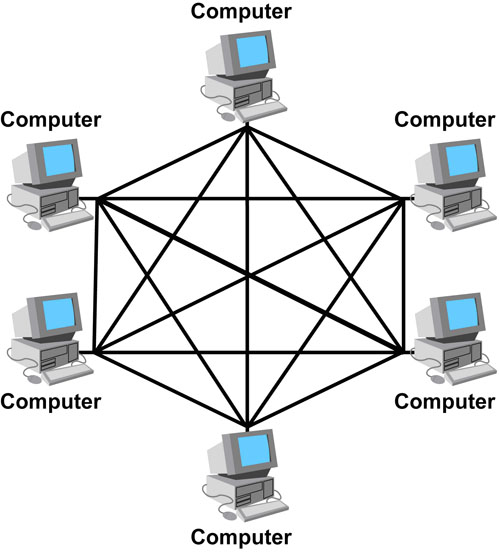
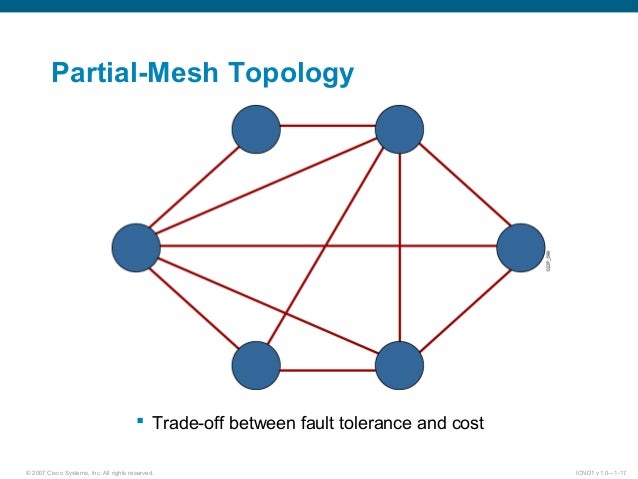
  A network setup where each computer and network device is interconnected with one another, allowing for most transmissions to be distributed, even if one of the connections go down. It is a topology commonly used for wireless networks.

Image result for full mesh topology

  In a full mesh topology, every computer in the network has a connection to each of the other computers in that network. The number of connections in this network can be calculated using the following formula (n is the number of computers in the network): n(n-1)/2

Related image
  In a partially connected mesh topology, at least two of the computers in the network have connections to multiple other computers in that network. It is an inexpensive way to implement redundancy in a network. In the event that one of the primary computers or connections in the network fails, the rest of the network continues to operate normally.

Hybrid Topology
Image result for hybrid topology

  A type of network topology that uses two or more differing network topologies. These topologies include a mix of bus topology, mesh topology, ring topology,and star topology.

Related image

Sources:
https://whatis.techtarget.com/definition/network-topology
https://www.computerhope.com/jargon/l/linear-bus-topology.htm
https://www.computerhope.com/jargon/s/startopo.htm
https://www.computerhope.com/jargon/r/ringtopo.htm
https://www.computerhope.com/jargon/m/mesh.htm
//www.computerhope.com/jargon/h/hybrtopo.htm

Thursday, 9 August 2018

What are the Types of Computer Network?


PAN- Personal Area Network


1) A personal area network (PAN) is the interconnection of information technology devices within the range of an individual person, typically within a range of 10 meters.


 For example, a person traveling with a laptop, a Personal Digital Assistant (PDA), and a portable printer could interconnect them without having to plug anything in, using some form of wireless technology. Typically, this kind of personal area network could also be interconnected without wires to the Internet or other networks.

Image result for personal area network

  Also see wireless personal area network (WPAN) which is virtually a synonym since almost any personal area network would need to function wirelessly. Conceptually, the difference between a PAN and a wireless LAN is that the former tends to be centered around one person while the latter is a local area network (LAN) that is connected without wires and serving multiple users.


2) In another usage, a personal area network (PAN) is a technology that could enablewearable computer devices to communicate with other nearby computers and exchange digital information using the electrical conductivity of the human body as a data network. 

Related image

  For example, two people each wearing business card-size transmitters and receivers conceivably could exchange information by shaking hands. The transference of data through intra-body contact, such as handshakes, is known as linkup. The human body's natural salinity makes it a good conductor of electricity. An electric field passes tiny currents, known as Pico amps, through the body when the two people shake hands. The handshake completes an electric circuit and each person's data, such as e-mail addresses and phone numbers, are transferred to the other person's laptop computer or a similar device. A person's clothing also could act as a mechanism for transferring this data.

LAN- Local Area Network


  A local area network (LAN) is a group of computers and associated devices that share a common communications line or wireless link to a server. Typically, a LAN encompasses computers and peripherals connected to a server within a distinct geographic area such as an office or a commercial establishment. Computers and other mobile devices use a LAN connection to share resources such as a printer or network storage.

Image result for wide area network animation

  Ethernet and WiFi are the two primary ways to enable LAN connections. Ethernet is a specification that enables computers to communicate with each other. WiFi uses radio waves to connect computers to the LAN. Other LAN technologies, including Token Ring, Fiber Distributed Data Interface and ARCNET, have lost favor as Ethernet and WiFi speeds have increased. The rise of virtualization has fueled the development of virtual LAN's, which allows network administrators to logically group network nodes and partition their networks without the need for major infrastructure changes.


  Typically, a suite of application programs can be kept on the LAN server. Users who need an application frequently can download it once and then run it from their local device. Users can order printing and other services as needed through applications run on the LAN server. A user can share files with others stored on the LAN server; read and write access is maintained by a network administrator. A LAN server may also be used as a web server if safeguards are taken to secure internal applications and data from outside access.


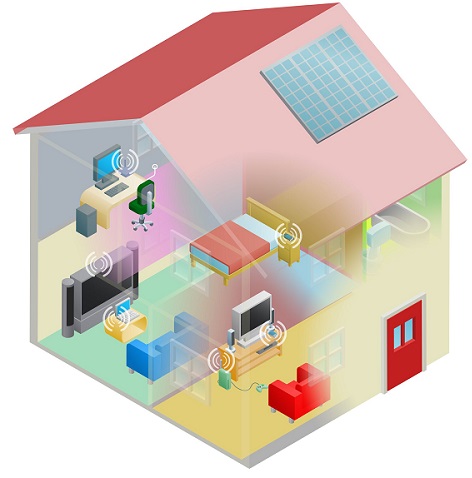
  In some situations, a wireless LAN, or WiFi, may be preferable to a wired LAN connection because of its flexibility and cost. Companies are assessing WLAN's as primary means of connectivity as the number of smartphones, tablets and other mobile devices proliferate.

MAN- Metropolitan Area Network


A metropolitan area network (MAN) is a network that interconnects users with computer resources in a geographic area or region larger than that covered by even a large local area network (LAN) but smaller than the area covered by a wide area network (WAN). 

Image result for Metropolitan area network

  The term is applied to the interconnection of networks in a city into a single larger network (which may then also offer efficient connection to a wide area network). It is also used to mean the interconnection of several local area networks by bridging them with backbone lines. The latter usage is also sometimes referred to as a campus network.Examples of metropolitan area networks of various sizes can be found in the metropolitan areas of London, England; Lodz, Poland; and Geneva, Switzerland. Large universities also sometimes use the term to describe their networks. A recent trend is the installation of wireless MAN's.

WAN- Wide Area Network


  A wide area network (WAN) is a geographically distributed private telecommunications network that interconnects multiple local area networks (LAN's). 

Related image

  In an enterprise, a WAN may consist of connections to a company's headquarters, branch offices, colocation facilities, cloud services and other facilities. Typically, a router or other multi-function device is used to connect a LAN to a WAN. Enterprise WAN's allow users to share access to applications, services and other centrally located resources. This eliminates the need to install the same application server, firewall or other resource in multiple locations, for example.

Related image

  A virtual private network (VPN) facilitates connectivity between WAN sites. An IPsec VPN is more commonly used in continuously open site-to-site connections, such as those between branch offices and headquarters locations. An SSL VPN is often the preferred choice for enabling remote access for individual users because the data transmitted from users across the WAN is encrypted. 


Related image

Direct fiber optic links are also used to connect sites on a WAN – and they almost always offer greater performance, reliability and security than VPN's, but they are cost-prohibitive for most enterprises to procure and operate.


Source:
https://searchmobilecomputing.techtarget.com/definition/personal-area-network
https://searchnetworking.techtarget.com/definition/local-area-network-LAN
https://searchnetworking.techtarget.com/definition/metropolitan-area-network-MAN
https://searchenterprisewan.techtarget.com/definition/WAN